

Individual Profile
An Individual Profile is AdvanGuard's central identity record for a natural person. It persists across multiple verification sessions, stores all verified data, and anchors AML monitoring and risk scoring.
Manage Profiles
View, filter, and review Individual Profiles in the AdvanGuard platform.
Dashboard — Individual Profile list
In the Dashboard, navigate to Profiles → Individual Profiles to see the list of all individual profiles.
| Column | Description |
|---|---|
| Name | Displayed name from the Profile's identity data. Also shows the UserID, your externalUserId, below the name. |
| Level ID | The verification Level used by the most recently completed Application. |
| Nationality | Nationality from the Profile's identity data, ISO country code + flag. |
| Status | ACTIVE — The Profile actively uses monitoring. The list hides inactive Profiles by default. |
| Created At | Timestamp when the Profile was first created. |
Profile detail view
The Profile detail page is organized into tabs:
| Tab | What it shows |
|---|---|
| Overview | The Overview tab shows the complete Profile snapshot. It is divided into three sections:
|
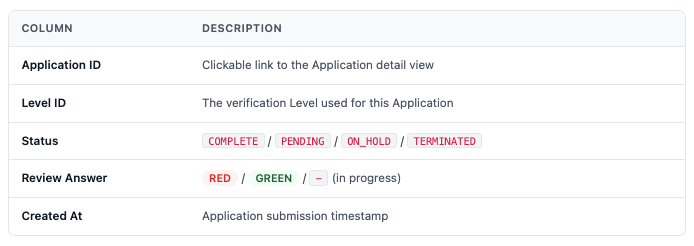
| Applications | Full history of Applications linked to this Profile. All Applications ever submitted for this Profile, with columns:
|
| ScoreCard | Current risk score, risk level, factor breakdown with parameter values, and triggered rules. Shows the “Update required” state when an AML case is open. |
| ChangeRecords | A chronological log of every change to the Profile, including Profile creation, status changes (INIT → ACTIVE), Level updates, and fixedInfo field updates. Each entry shows the timestamp, action type, and the full JSON change payload — useful for compliance audits and debugging. |
Profile lifecycle
Every Individual Profile follows a two-state lifecycle:
API reference
All Individual Profile operations use the following endpoints. Click any card to jump to the full API documentation.
POST/v1/individual/profilesCreate a Profile→GET/v1/individual/profiles/{profileId}Get Profile by ID→POST/v1/individual/profiles/{profileId}Update a Profile (merge-patch)→POST/v1/individual/profiles/{profileId}/activateActivate Profile (init → active)→GET/v1/individual/profiles/by_ext/{externalUserId}Get Profile by external ID→POST/v1/individual/profiles/by_ext/{externalUserId}/activateActivate by external ID→
Updated 12 days ago
Did this page help you?