

Company Verification Level
This article outlines the verification steps available to verify a company. Combine the steps listed below to construct a complex verification flows based on your scenario.
Note:
- Company verification steps can be configured separately for the subject company, associated companies, and associated individuals. (Such as the verification steps of the subject company is questionnaire, registry check, aml, master card/visa card check; the verification steps of the associated company is registry check, AML; the verification steps of the associated individuals is eKYC check, AML.)
- Company verification steps currently only can be deleted or add steps, but can not be changed the orders.
Company Verification Steps
The following risk checks are as company verification steps, which run on the subject company, associated company, and associated individuals. The applicable risk checks in the company verification level configuration depend on the applicable entities and the company's registration country.
| Risk Checks | Description | Applicable Entities |
|---|---|---|
| Questionnaire | The questionnaire within the KYB process is a dynamic form used to collect specific information about a company—such as the nature of its business, sources of funds, or ownership structure—in order to assess compliance risks. This questionnaire can be customized. | Subject Company |
| Registry Check | Validates the company's registration information against the official business registry of the incorporation country. Includes company status, registration number, registered address, and officer/shareholder details. | Subject Company, Associated Company |
| Charity Check | Checks whether the entity is registered as a charity or non-profit — sourced from relevant government registries (e.g. Singapore Commissioner of Charities). | Subject Company, Associated Company (only SG) |
| Society Check | Checks whether the entity is registered as a society — sourced from relevant government registries (e.g. Singapore Registrar of Societies). | Subject Company, Associated Company (only SG) |
| Company AML Check | Screens the company against global sanctions lists, PEP registries, and adverse media databases. | Subject Company, Associated Company |
| Website Profile Assessment | Analysis of the company's website manually for policy compliance, prohibited content, business category verification, and terms of service alignment. | Subject Company, Associated Company |
| Master Card Check | Cross-references the company against the MasterCard MATCH (Member Alert to Control High-risk Merchants) terminated merchant list to identify high-risk payment processing history. | Subject Company |
| Visa Card Check | Cross-references against Visa's Global Merchant Chargeback Monitoring Program (VGMCMP) and Visa Merchant Alert Service (VMAS) lists to identify merchants with elevated chargeback or fraud history. | Subject Company |
| eKYC Check | Identity verification of associated individuals (directors, shareholders, UBOs) — ID document verification, face verification, risk check, etc. | Associated Individual |
| Individual AML Check | Screens the company's associated individuals against global sanctions lists, PEP registries, and adverse media databases. | Associated Individual |
Risk Checks on applicable entities
In addition to the subject company, AdvanGuard runs risk checks on associated companies and associated individuals linked to the application, for example parent companies, subsidiaries, directors, UBOs, and shareholders.
Subject Company
Parent companies, subsidiaries, or intermediate holding entities linked in
the corporate structure.
- ✓ Registry Check
- ✓ Charity Check
- ✓ Society Check
- ✓ Website Profile Assessment
- ✓ Company AML Check
- ✓ Visa Card Check
- ✓ Master Card Check
Associated Companys
Directors, shareholders, UBOs, and authorized signatories declared in the
application.
- ✓ Registry Check
- ✓ Charity Check
- ✓ Society Check
- ✓ Company AML Check
- ✓ Website Profile Assessment
Associated Individuals
Directors, shareholders, UBOs, and authorized signatories declared in the
application.
- ✓ eKYC Check
- ✓ Individual AML Check
Configuration- Company Verificaition Level
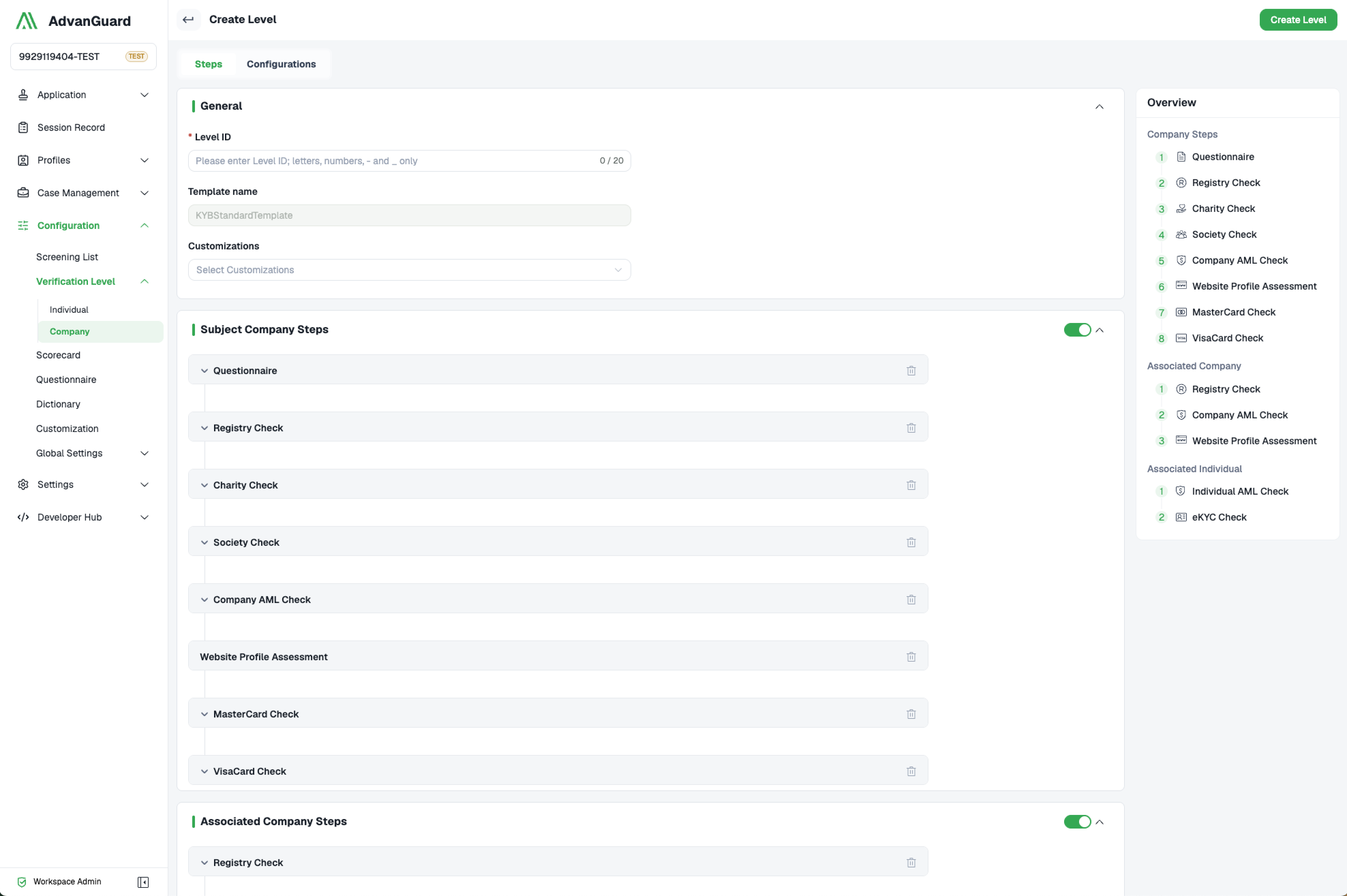
In the AdvanGuard plantform, navigate to Configuration → Verification Level → Company to see the configuration page for company verification level.
Steps:
General:
- Level ID: Company verification level unique ID/name by using letters, numbers, -and_ only.
- Template name: Company verification level template. Currently only KYB Standard Template can be used.
- Customizations: Select customizations from the pre-configured UI customization list.
Subject Company Steps:
-
Questionaire: Select a questionnaire from the pre-configured questionnaire list.
-
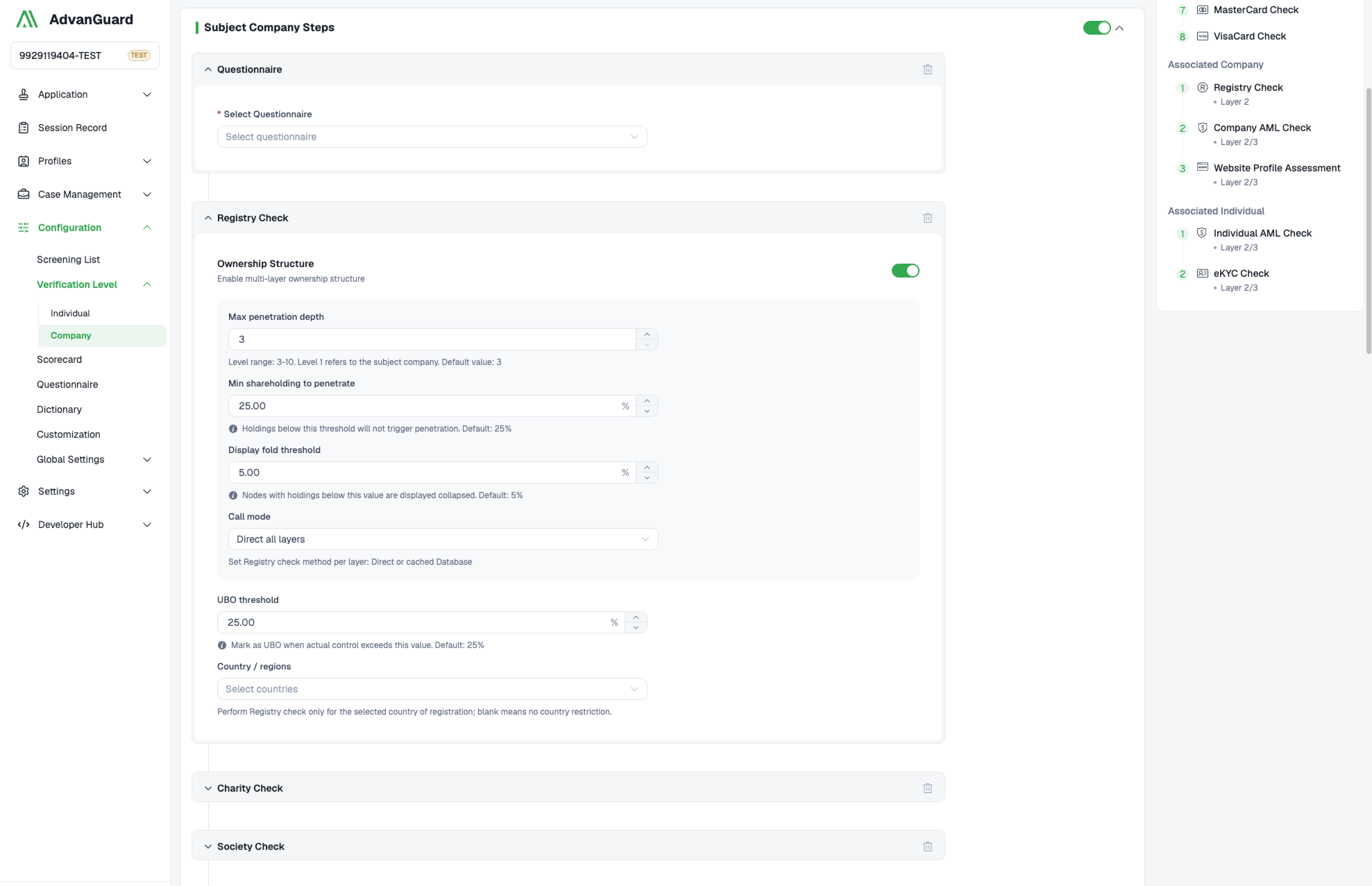
Registry Check: Configuration for checking the registration information of the subject company.
UBO threshold: Mark as UBO when actual control exceeds this value. Default: 25%.
Country / regions: Perform Registry check only for the selected country of registration; blank means no country restriction.
Ownership Structure: Enable multi-layer ownership structure. The max penetration depth, min shareholding to penetrate,display fold threshold, call mode can be configured. When the application runs, every layer‘s information will be displaied on Company Structure and Associated Profiles. By default the response covers the subject company and its own register only(subject company is as layer 1).Set maxLayer (3-10, default 3) to walk further up the ownership chain: every corporate shareholder on a register is looked up in turn, layer by layer, until maxLayer is reached. Associate companies and individuals are as layer 2.
-
Charity Check: Run only for companies registered in the selected regions. Only Singapore can be used.
-
Society Check: Run only for companies registered in the selected regions. Only Singapore can be used.
-
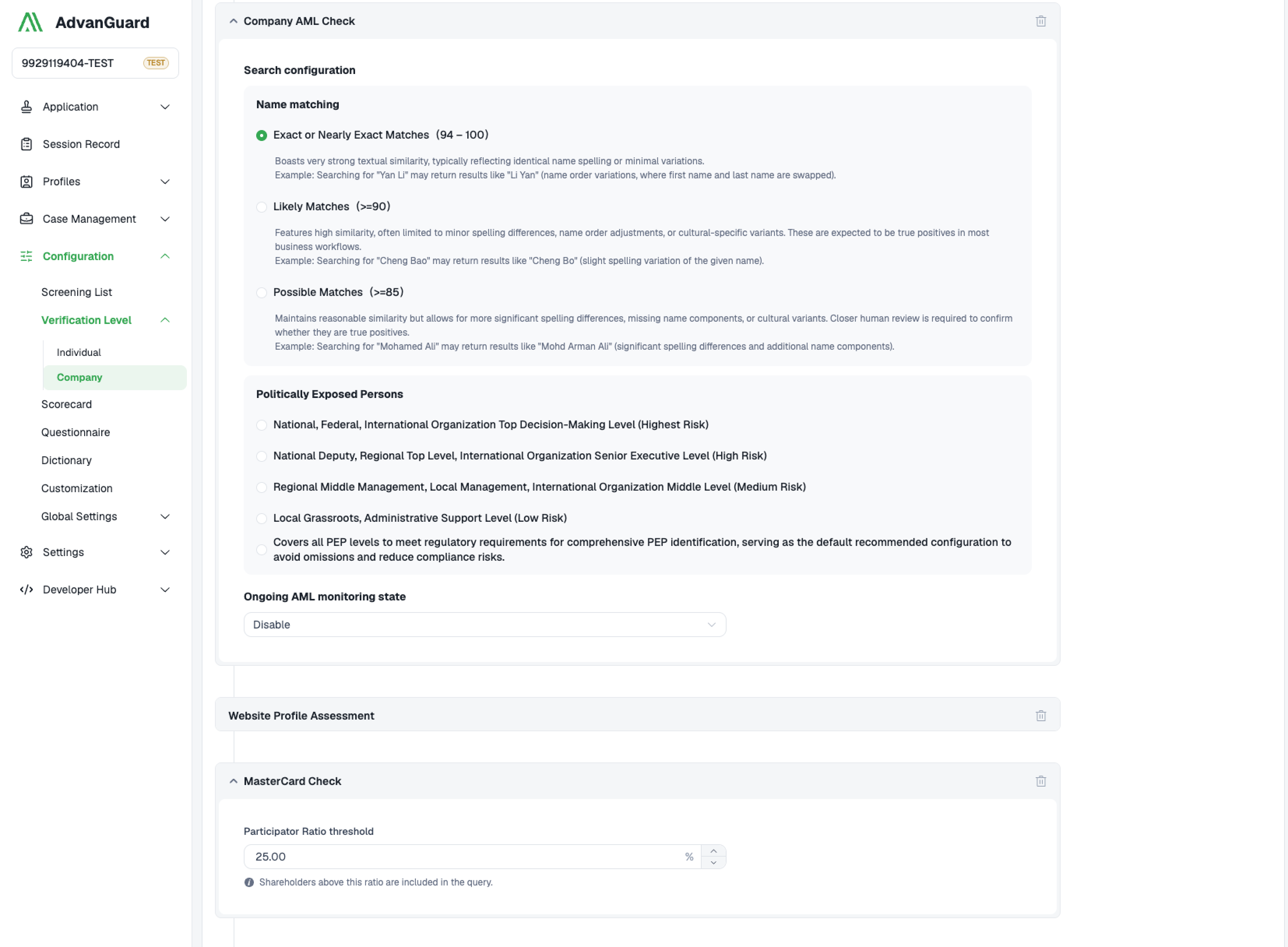
Company AML Check: Configuration for checking AML of the subject companies.
Search configuration:Configurate the name matching level and politically exposed persons level.
Ongoing AML monitoring state:Disable/Enable the ongoing AML monitoring.
-
Website Profile Assessment: There are currently no configuration options.
-
Master Card Check: Participator ratio threshold can be configured. Shareholders above this ratio are included to be checked.
-
Visa Card Check: Participator ratio threshold can be configured. Shareholders above this ratio are included to be checked.
Associated Company Steps:
-
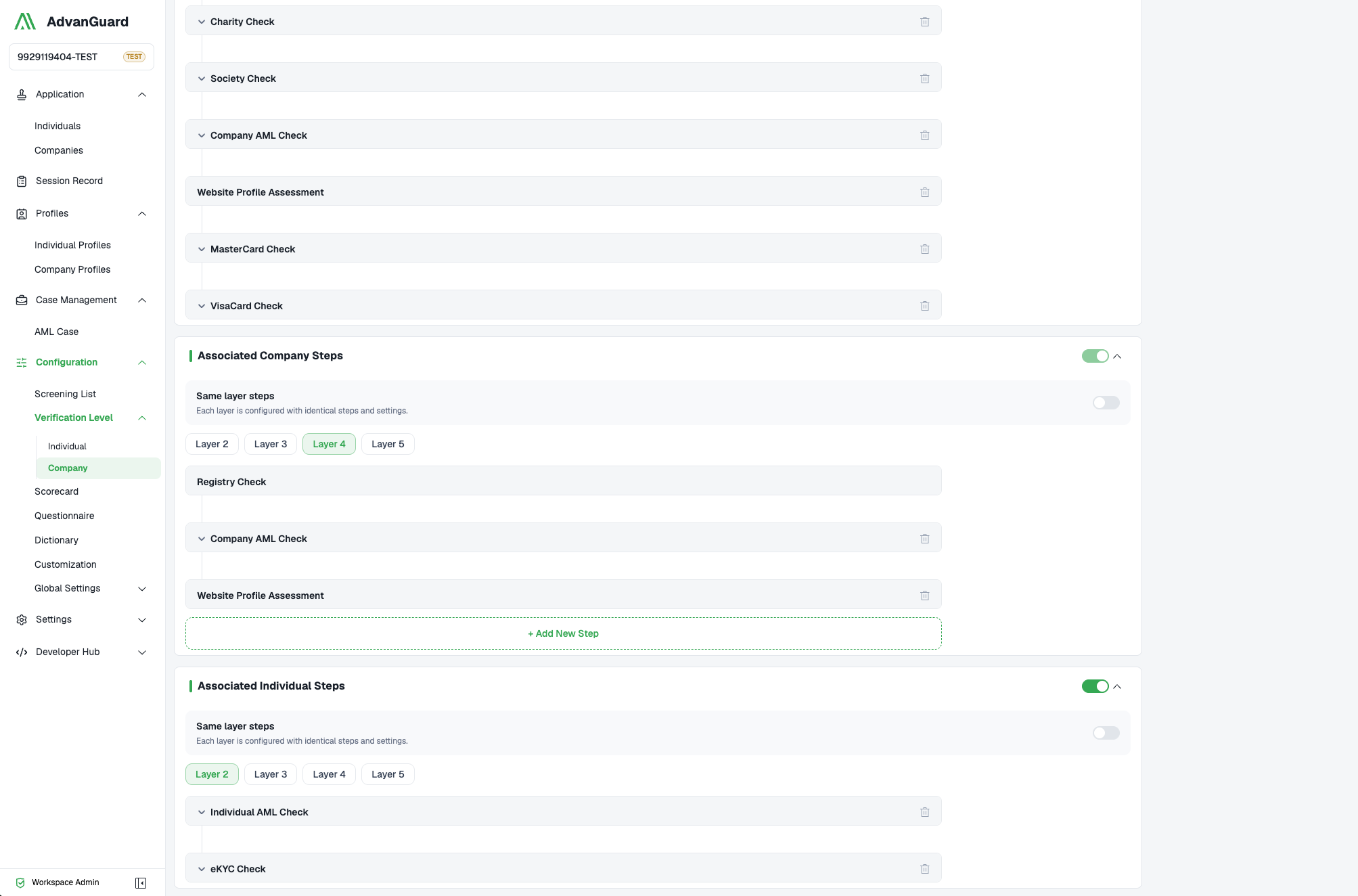
Registry Check: Configuration for checking the registration information of the associated companies.
UBO threshold: Mark as UBO when actual control exceeds this value. Default: 25%.
Country / regions: Perform Registry check only for the selected country of registration; blank means no country restriction.
Multi-layers: When switch on the ownership structure of the subject company, the verification steps of the associated companies can be configured for every layer. By default the response covers the subject company and its own register only(subject company is as layer 1).Set maxLayer (3-10, default 3) to walk further up the ownership chain: every corporate shareholder on a register is looked up in turn, layer by layer, until maxLayer is reached. Associate companies and individuals are as layer 2. So when switch on the ownership structure of the subject company, the part of Associated Company Steps can not be deleted.
-
Charity Check: Run only for companies registered in the selected regions. Only Singapore can be used.
-
Society Check: Run only for companies registered in the selected regions. Only Singapore can be used.
-
Company AML Check: Configuration for checking AML of the associated companies.
Search configuration:Configurate the name matching level and politically exposed persons level.
Ongoing AML monitoring state:Disable/Enable the ongoing AML monitoring, and share ratio threshold.
-
Website Profile Assessment: There are currently no configuration options.
Associated Company Steps
Associated Individual Steps:
-
eKYC Check: Configuration for checking the registration information of the associated individual.
KYC Level: Select a KYC verification level from the pre-configured individual level list. (There isn't one yet, but it is expected to be added before the end of December.)
Country / regions: Run only for individuals in the selected regions.
Share ratio threshold: Shareholders above this ratio are included to be verified.
Multi-layers: When switch on the ownership structure of the subject company, the verification steps of the associated companies can be configured for every layer.
-
Individual AML Check: Configuration for checking AML of the associated individual.
KYC Level: Select a KYC verification level from the pre-configured individual level list. (There is one, but it is expected to be removed before the end of December.)
Share ratio threshold: Shareholders above this ratio are included to be verified.
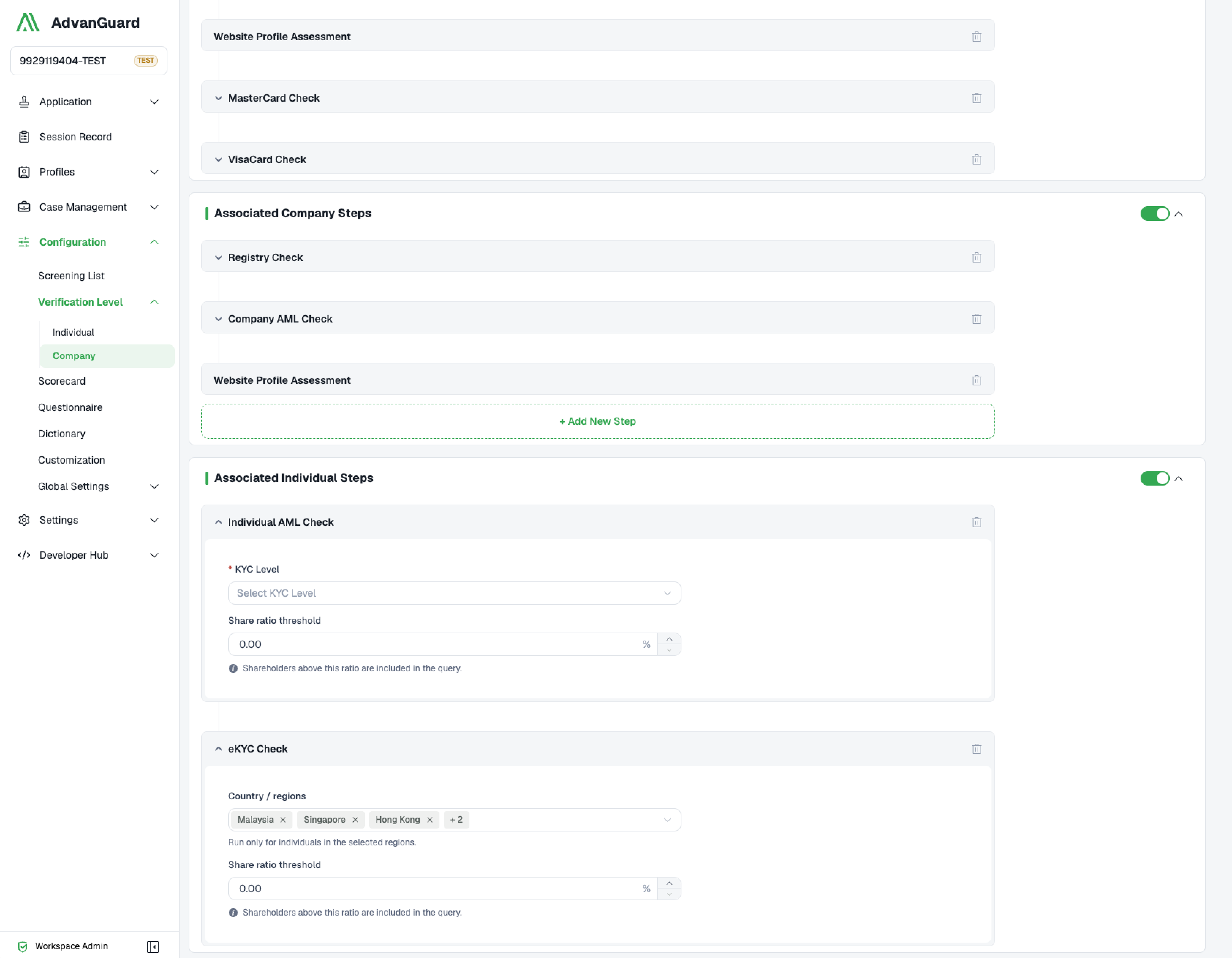
Associated Individual Steps
Configurations:
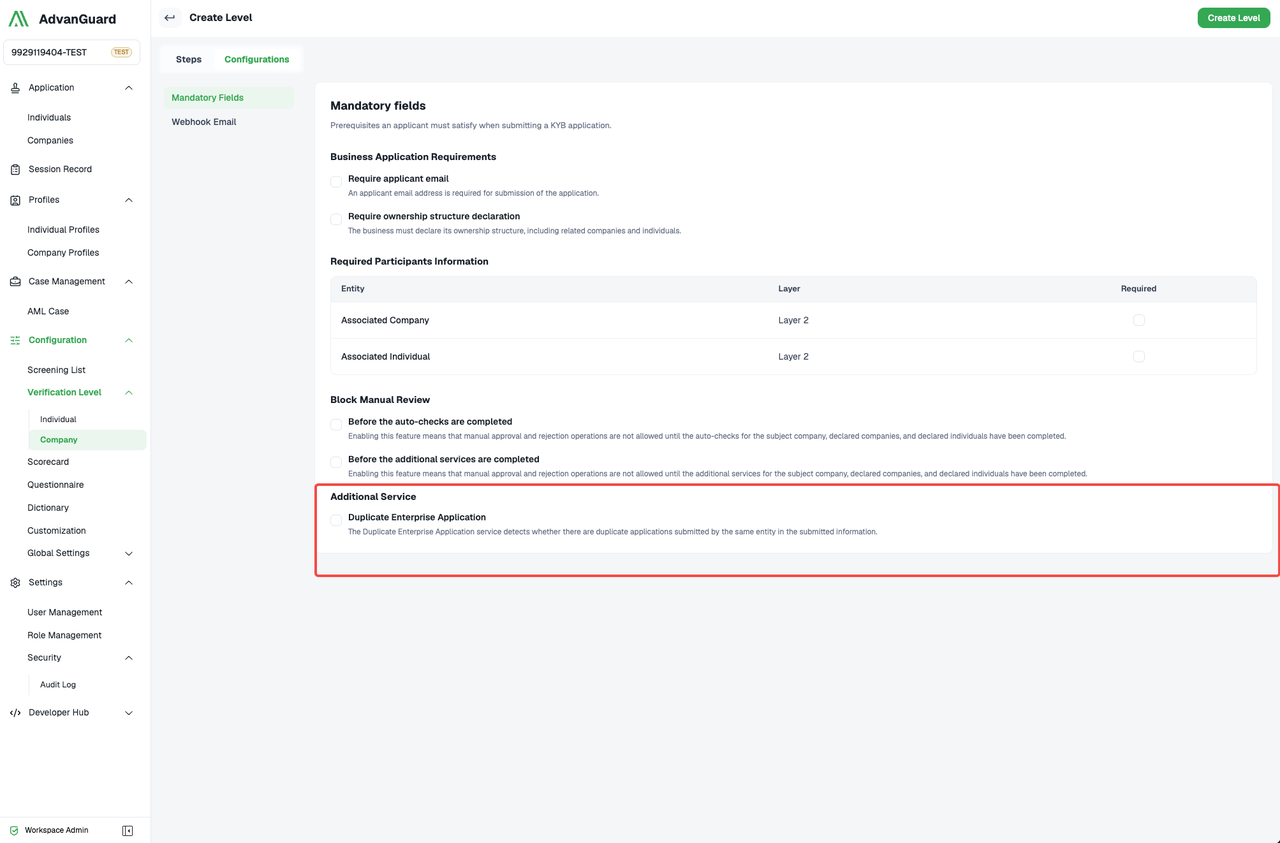
Mandatory Fields:
-
Block Manual Review:
Two switches. (1)Before the auto-checks are completed. Enabling this feature means that manual approval and rejection operations are not allowed until the auto-checks for the subject company, declared companies, and declared individuals have been completed. (2)Before the additional services are completed. Enabling this feature means that manual approval and rejection operations are not allowed until the additional services for the subject company, declared companies, and declared individuals have been completed.
-
Additional Service:
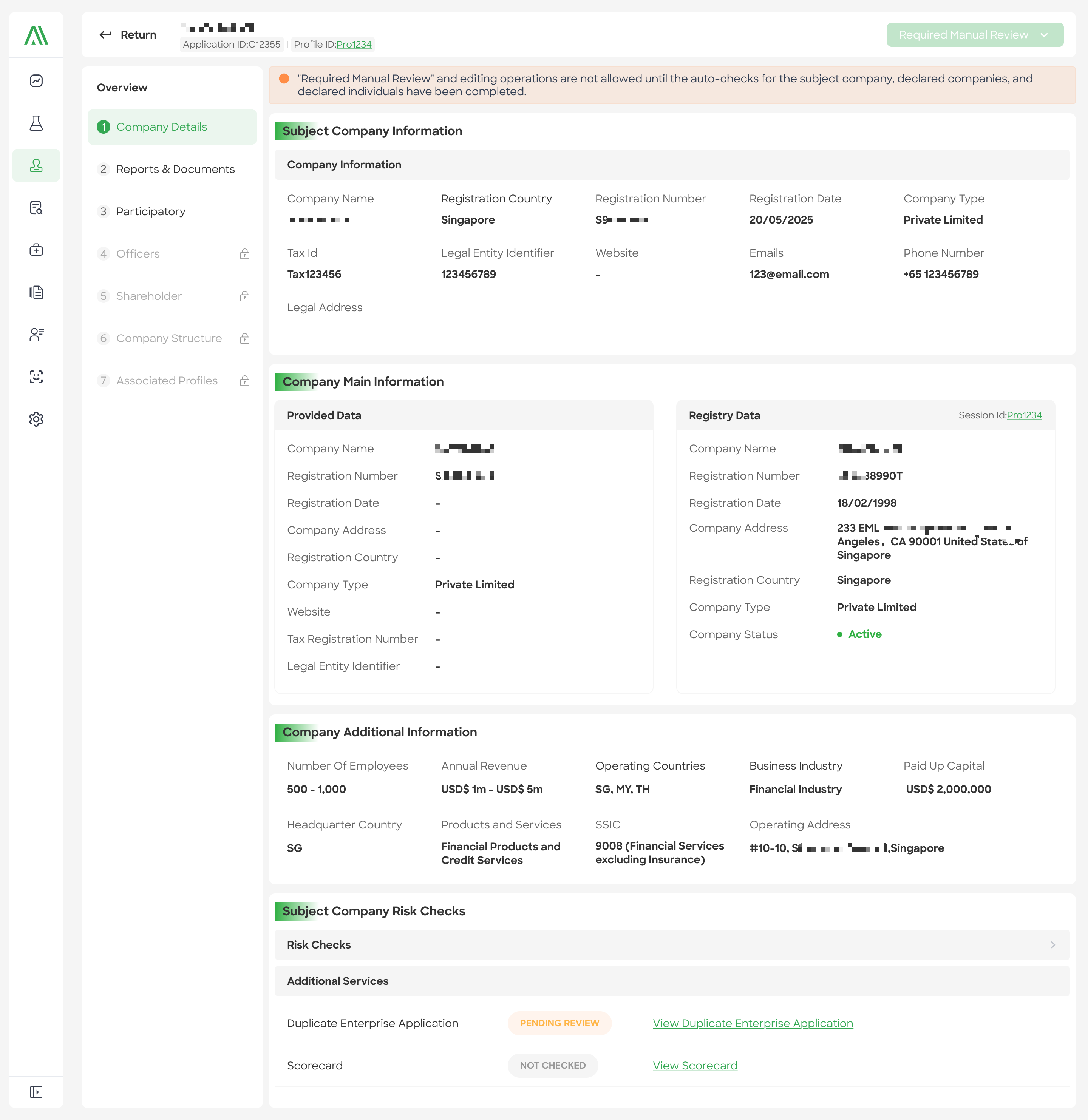
Duplicate Enterprise Application:The Duplicate Enterprise Application service detects whether there are duplicate applications submitted by the same entity in the submitted information.
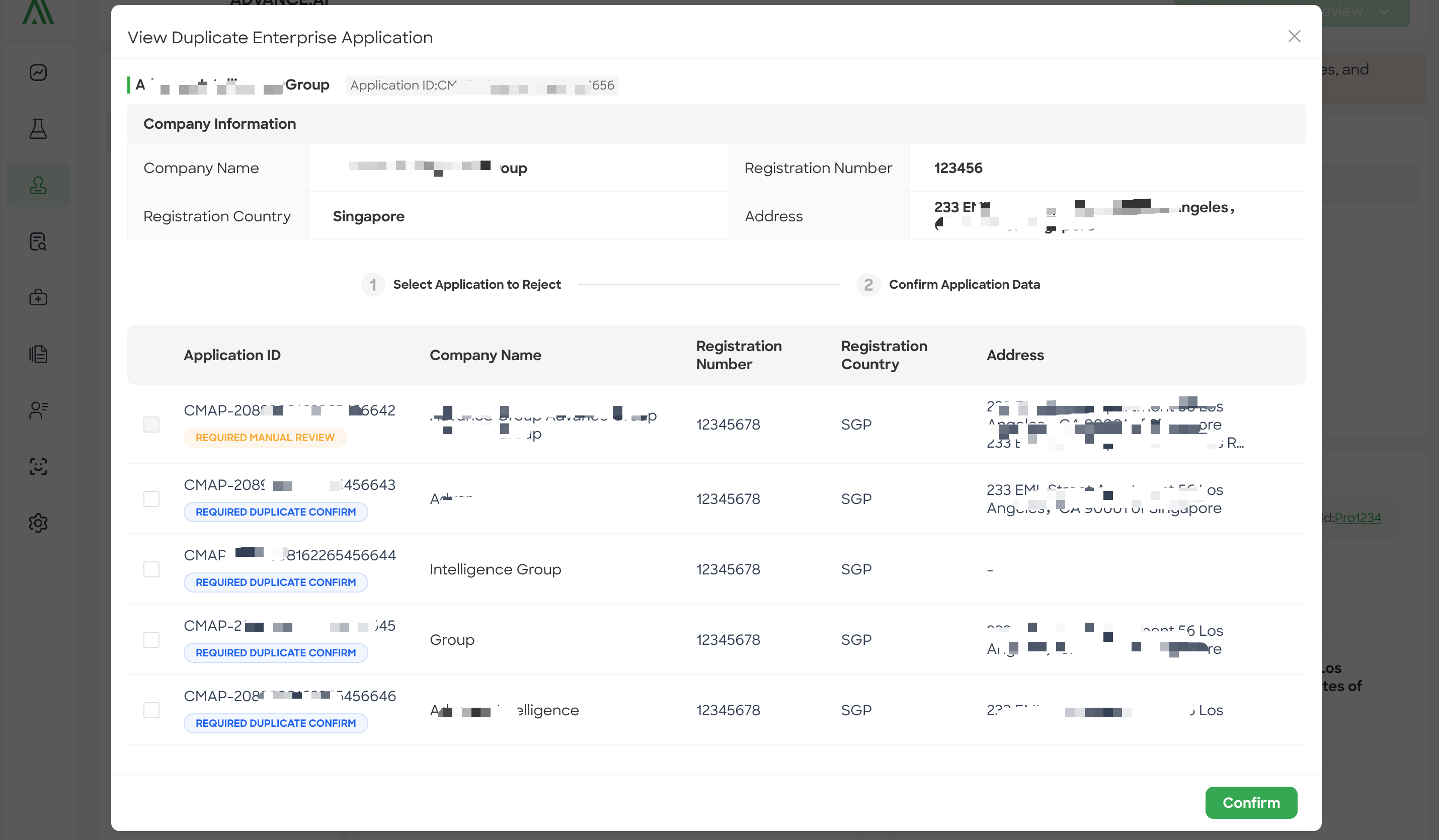
This service matches duplicate businesses based on the same country and registry number. It operates after form submission but before the checks are executed. However, this service blocks the execution of checks; if it doesn't complete, it affects the check execution. If it fails, it doesn't affect the check execution, essentially ignoring the service result.
If the service result requires manual confirmation, you can check the box and confirm. This includes checking other applications that are not currently in progress; these will be automatically rejected. Confirming without checking the box confirms that there are no duplicate businesses. -
Business Application Requirements: It is a restriction on the submission of applications.
-
Required Participants Information: It is a restriction on the submission of applications.
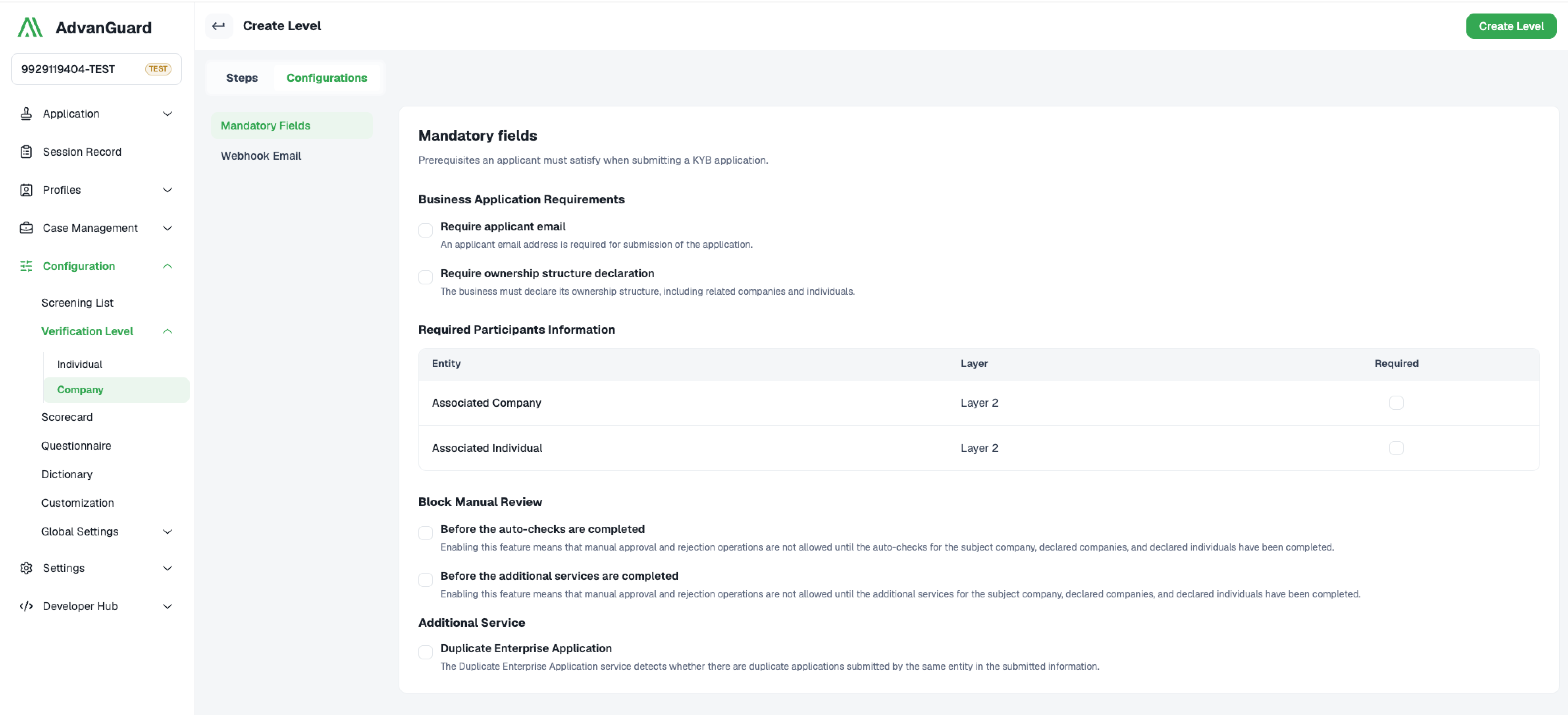
Mandatory Fields
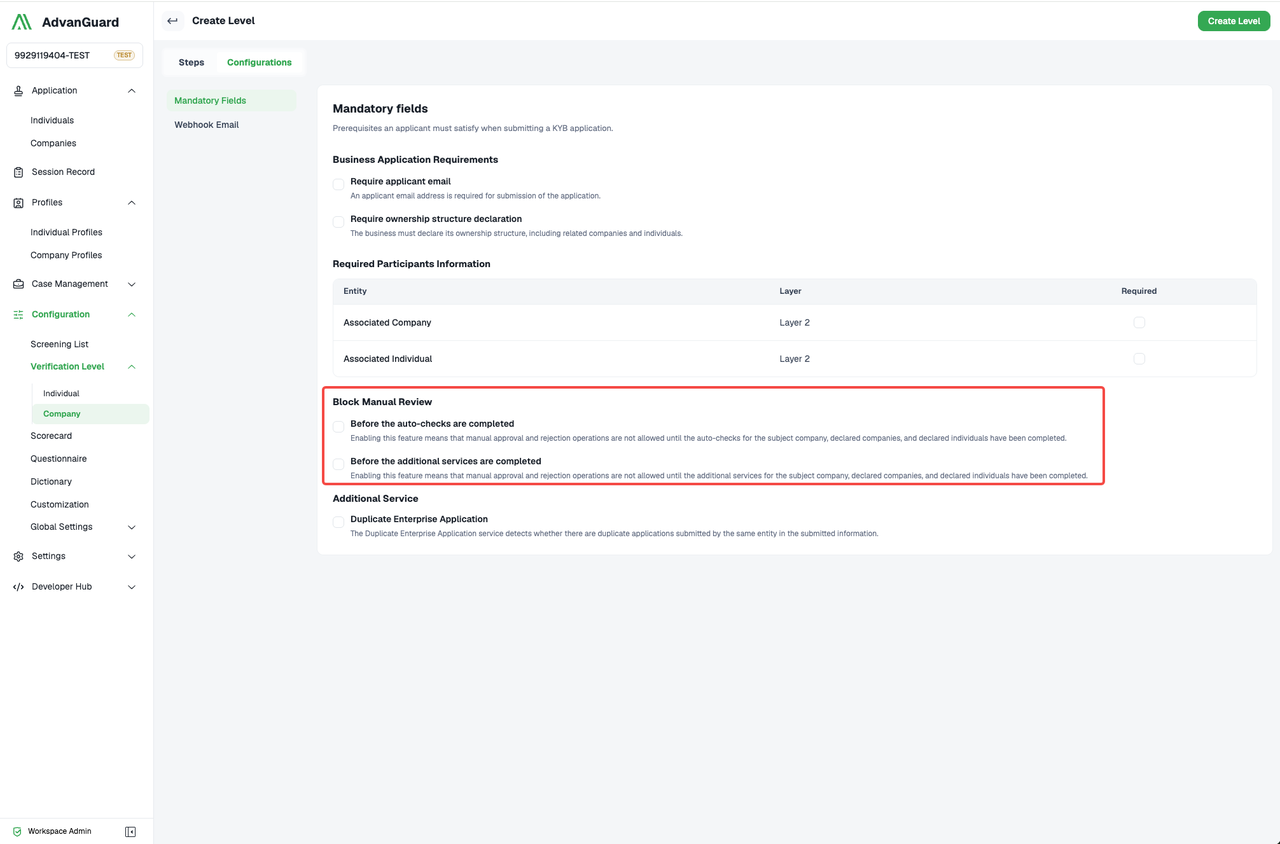
Block Manual Review
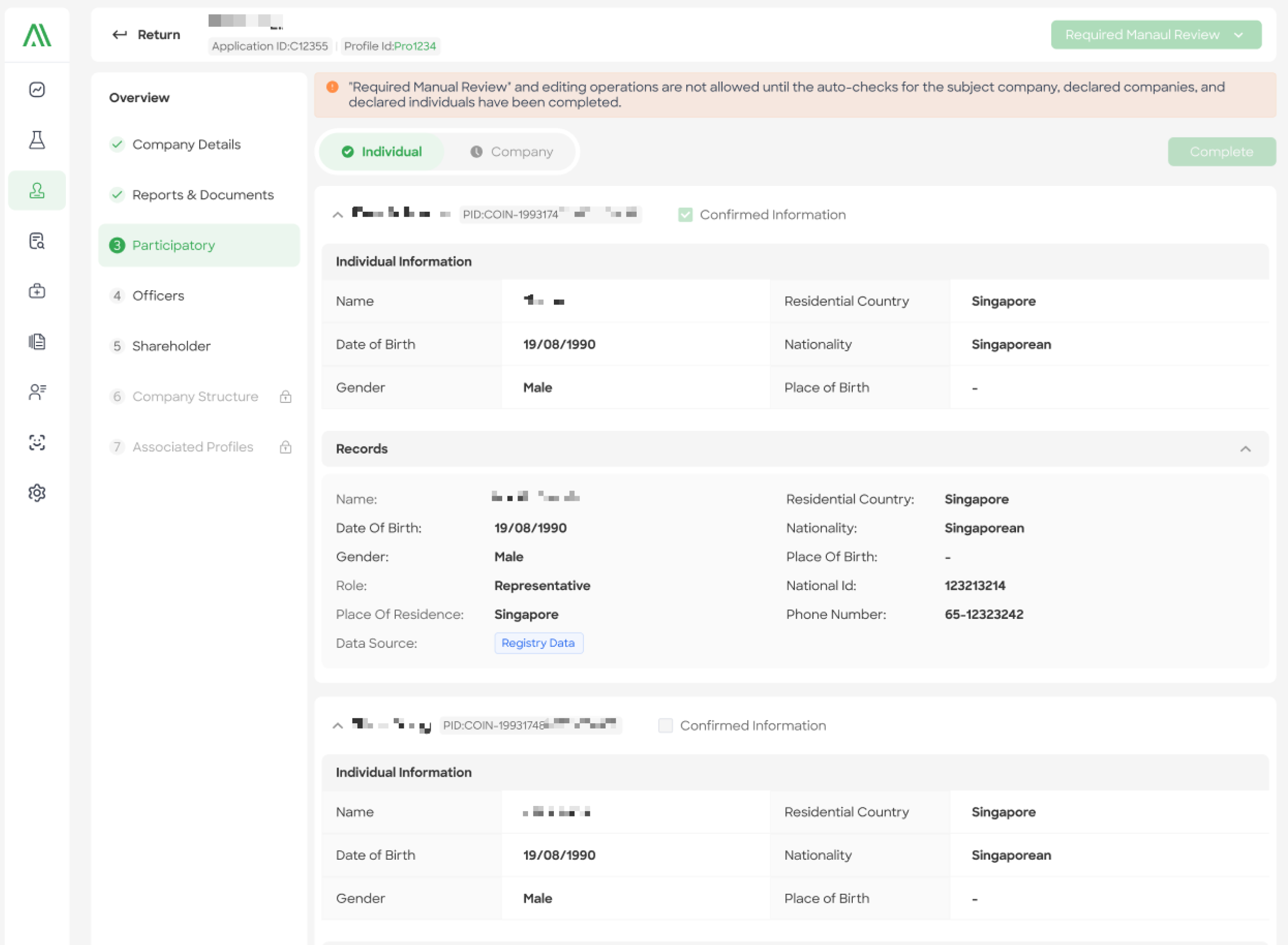
Additional Service
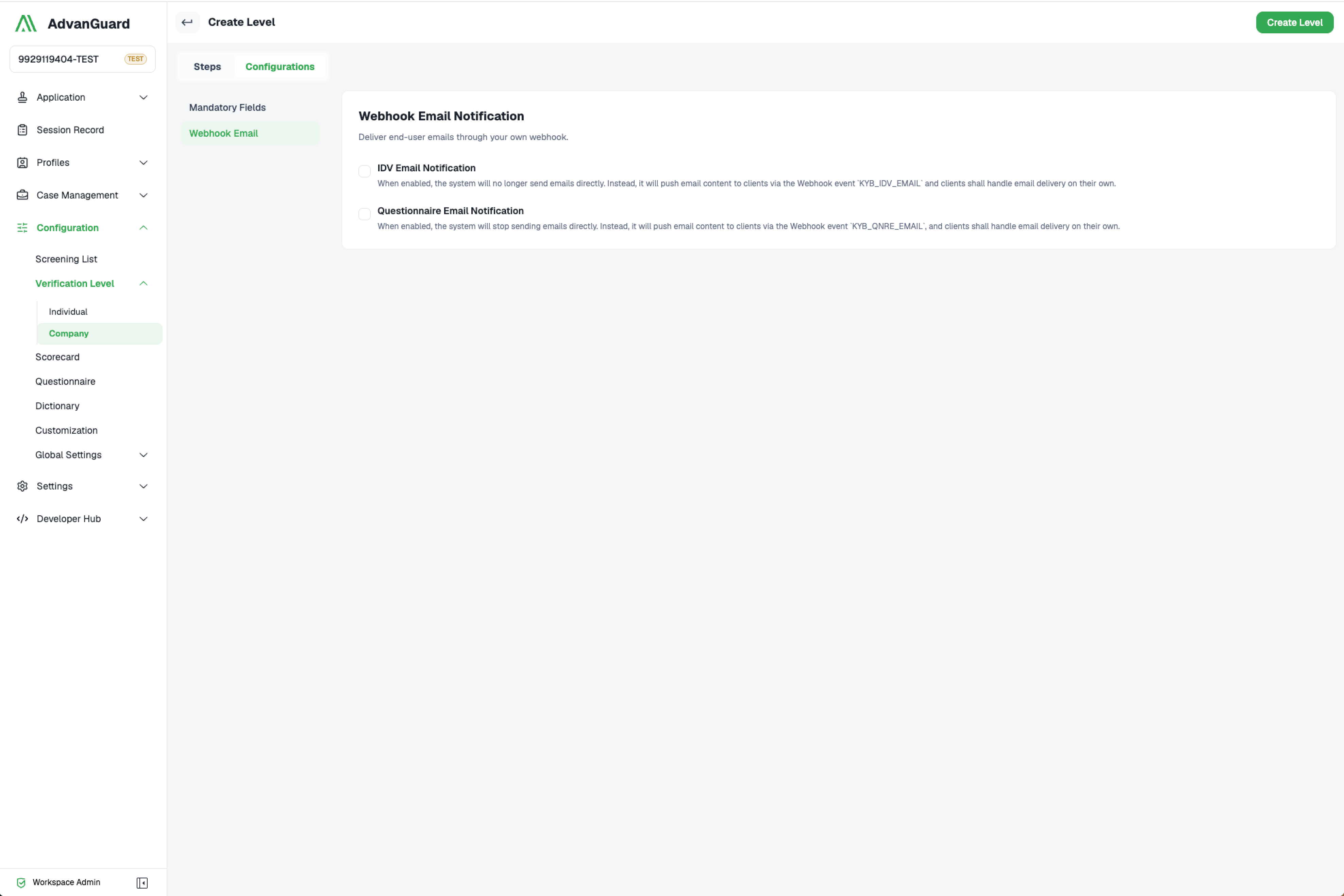
Webhook Email:
-
IDV Email Notification:
When enabled, the system will no longer send emails directly. Instead, it will push email content to clients via the Webhook event
KYB_IDV_EMAILand clients shall handle email delivery on their own. -
Questionnaire Email Notification:
When enabled, the system will stop sending emails directly. Instead, it will push email content to clients via the Webhook event
KYB_QNRE_EMAIL, and clients shall handle email delivery on their own.
Webhook Email
Updated about 1 month ago